Production-grade AWS deployments in minutes, not months. Define your pipeline in YAML, connect your AWS accounts, and Dev Ramps handles multi-account rollouts, approvals, rollbacks, and monitoring.
Dev Ramps is an AWS-native CI/CD platform that lets teams define deployment pipelines in YAML and ship to production with built-in rollbacks, approval gates, and monitoring. It supports multi-account, multi-region AWS deployments with first-class AI agent integration for autonomous deployments.
Who It's For
Whether you're building your platform from scratch or modernizing existing infrastructure, Dev Ramps meets you where you are.
Stop spending months building and maintaining custom CI/CD tooling. Get production-grade pipelines, multi-account management, and operational dashboards out of the box.
Upgrade from fragile scripts to declarative pipelines with rollbacks, bake times, deployment time windows, and CloudWatch alarm-triggered auto-rollback built in.
Let application teams ship to production without becoming AWS experts. Guardrails, approvals, and environment isolation keep everyone safe while moving fast.
AI coding agents can claim ephemeral environments, deploy their changes, verify the results, and iterate — all through a standard tool interface. Close the loop between code generation and validation.
Why Dev Ramps
Fast Path to Production
Replace deploy scripts, Makefiles, and GitHub Actions workflows with a single YAML file. Define what you want — Dev Ramps handles how.
See how it works →AWS-Native
One CLI command bootstraps least-privilege IAM roles across your AWS accounts. No manual CloudFormation, no credential management.
See how it works →Production Safety
Rollbacks, bake times, deployment time windows, and CloudWatch alarm-triggered auto-rollback — all built in, zero setup.
See how it works →Pipeline Health Metrics
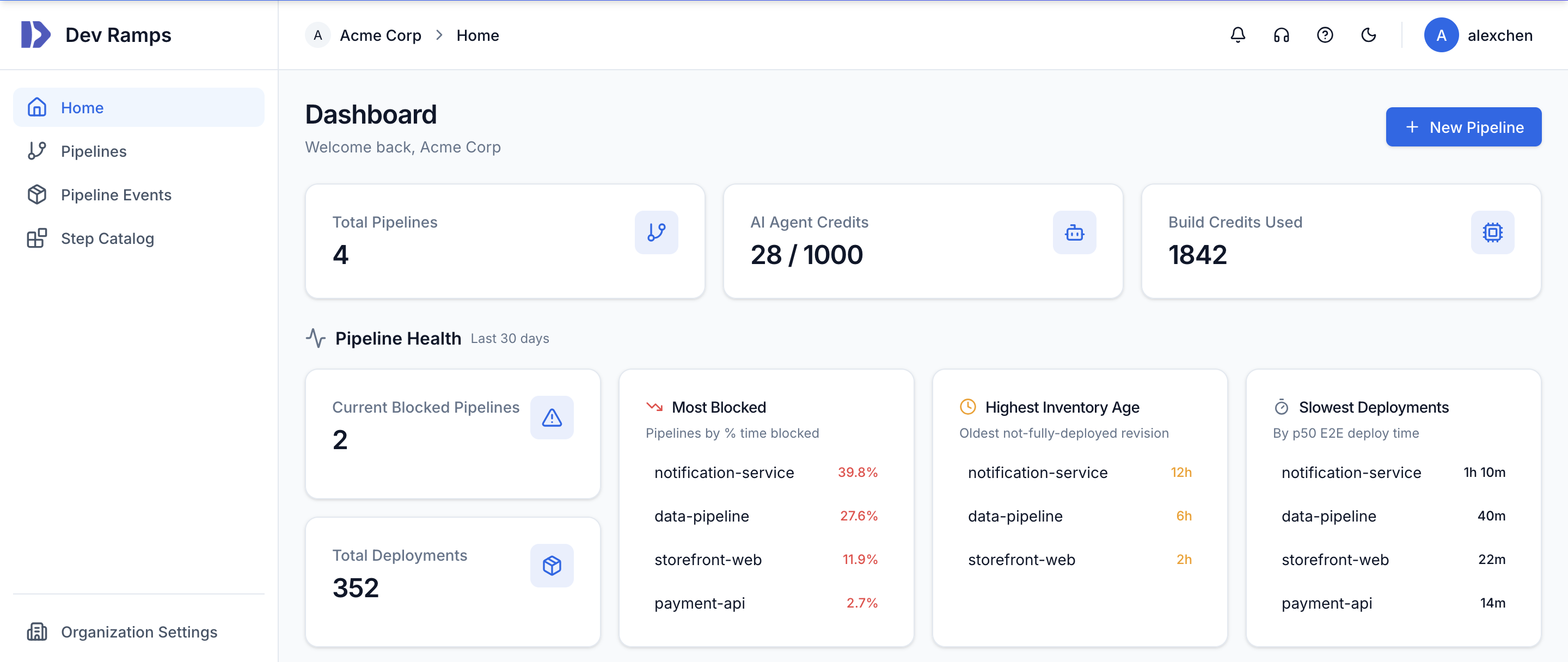
P50 deploy time, % time blocked, inventory age — see which pipelines slow your team down and identify bottlenecks before they become problems.
See how it works →
AI Agent Integration
AI coding agents claim ephemeral environments, deploy, verify, and iterate — all through a standard tool interface. Real infrastructure, not mocks.
See how it works →AI-Powered Reliability
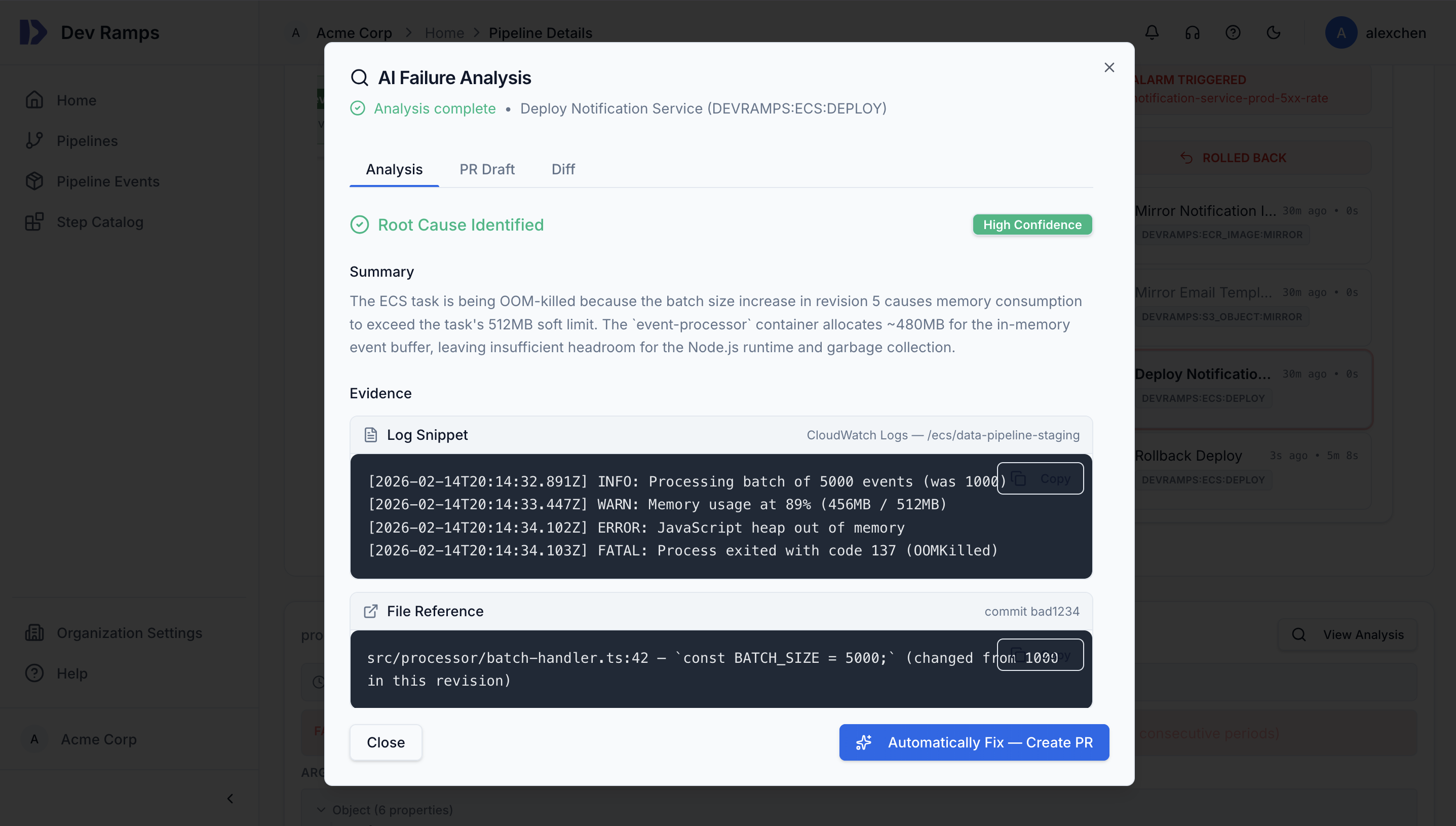
When a deployment fails, Dev Ramps AI reads your logs and source code, identifies the root cause, and can auto-generate a fix PR. Reduce pipeline toil and unblock developers faster.
How It Works
Three steps from zero to production-grade CI/CD on AWS.
Add a devramps.yaml to your repo. Define stages, steps, and artifacts — no scripting required. Connect GitHub and Dev Ramps watches for pushes automatically.
Run npx @devramps/cli bootstrap to set up least-privilege IAM roles. No manual CloudFormation — one command per account.
Push code and watch it flow through build, test, and deploy across AWS accounts. Approvals, rollbacks, and monitoring handled automatically.
Example
Here's what a typical pipeline definition looks like. Declarative, readable, and focused on what you want—not how to do it.
version: "1.0.0" pipeline: cloud_provider: AWS pipeline_updates_require_approval: ALWAYS stages: - name: staging account_id: "000000000000" region: us-east-1 - name: production account_id: "111111111111" region: us-west-2 # On-demand environments for AI agents and PR previews ephemeral_environments: agent-env: account_id: "222222222222" region: us-east-1 steps: # Deploy application to ECS - name: Deploy Service type: DEVRAMPS:ECS:DEPLOY params: cluster_name: ${{ steps.infra.ecs_cluster_name }} service_name: ${{ steps.infra.ecs_service_name }} image_url: ${{ artifacts["API Image"].image_url }} # Run smoke tests, then bake - name: Run Tests type: DEVRAMPS:APPROVAL:TEST goes_after: ["Deploy Service"] - name: 10 Minute Bake type: DEVRAMPS:APPROVAL:BAKE goes_after: ["Run Tests"] params: duration_minutes: 10 artifacts: API Image: type: DEVRAMPS:DOCKER:BUILD params: dockerfile: /services/api/Dockerfile
Security
Security isn't an afterthought. Every deployment runs with isolation, auditability, and access controls from day one.
Each environment runs in its own AWS account with isolated IAM boundaries.
Every deployment, approval, and infrastructure change is captured and searchable.
Require manual sign-off for production deployments with structured change diffs.
Dev can't touch prod. Strict separation enforced at the infrastructure level.
Integrations
Connect your repositories, receive notifications where your team works, and integrate with your existing observability stack.
Capabilities
Securely inject secrets into infrastructure and runtime environments. Integrated with AWS Secrets Manager with automatic rotation support.
On-demand isolated AWS environments for PR previews and AI agents. Agents claim, deploy, verify, and release. Automatic cleanup when sessions end.
Infrastructure changes show structured diffs before applying. Know exactly what will change before you approve.
When deployments fail, AI reads your logs and source code, identifies the root cause, and can auto-generate a fix PR to unblock your team.
Extend pipelines with the TypeScript SDK (@devramps/sdk-typescript). Build custom deployment steps for the last mile of your environment.
Standard tool interface for AI agents to manage deployments — claim environments, deploy commits, read logs, and monitor pipeline status programmatically.
Deploy to multiple AWS regions with region-specific configuration. Built-in support for active-active and disaster recovery patterns.
Production-grade AWS deployments in minutes, not months. First deployment in under 15 minutes.